New Enquiry to
Follow-Up Task
Original synthetic sample. AI-assisted drafting; not a deployed workflow or an approved client instruction. Version 1.0 · October 18, 2026.
For the operator who needs one answer: did the enquiry become a task, and what is safe to do next?
What starts it
A new record appears in the synthetic Enquiry Inbox with an enquiry ID, contact email and request summary. This example ends at a follow-up task, not a booking or a sent customer reply.
How you know it worked
Open Follow-up Tasks. Find exactly one task with the same enquiry ID, assigned to Intake Operator, with status Ready. A successful form submission alone is not completion evidence. The two-minute checking threshold below is illustrative, not a measured SLA.
The normal path
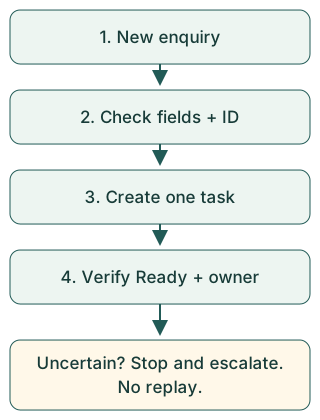
1. New enquiry enters Enquiry Inbox.
2. Required fields are checked.
3. The enquiry ID is checked against existing tasks.
4. One follow-up task is created in Follow-up Tasks.
5. Intake Operator checks the matching ID, assignee and Ready status.
6. Intake Operator handles the follow-up separately. The workflow does not contact the customer.
When something is wrong
Missing information: if a required field is absent, expect no Ready task. Intake Operator records the enquiry ID and missing field names, then asks Workflow Owner to confirm the approved correction path. Do not paste customer data into the escalation.
Missing result: if no matching task is visible after the illustrative two-minute threshold, Intake Operator records the enquiry ID and observation time and escalates to Workflow Owner. Do not resubmit or replay.
Uncertain duplicate: if more than one matching task appears, stop work on those tasks and escalate their internal IDs to Workflow Owner through the approved internal channel. Do not delete, merge or contact the customer twice. Workflow Owner investigates and explicitly approves any recovery.
Who does what
Intake Operator: checks the output, performs normal follow-up only after confirming one Ready task, and escalates uncertainty.
Workflow Owner: confirms field names, queue names, permissions, timing and exception policy; investigates failures and authorizes recovery. No real person, contact address or rota is assigned by this fictional sample.
Keep this reference accurate
Version 1.0 / 2026-10-18. Synthetic reference only. Recheck after any change to trigger, required fields, enquiry ID mapping, output queue, assignee, Ready status, checking threshold or escalation role. Workflow Owner approves the revised reference before use; record version, date, what changed and approval. No automatic synchronization or continuing maintenance is included.
Try the two-minute check
Before opening the answers, identify: (1) the trigger, (2) the exact success evidence, and (3) what to do when the result is missing. This is an untested reader exercise, not a claim that a human completed it in two minutes.
Show exercise answers
Trigger: a new Enquiry Inbox record. Success: exactly one matching Ready task assigned to Intake Operator. Missing result: record ID/time, escalate to Workflow Owner, no replay or resubmission.